標籤

2023年4月6日 星期四

VPN 出現 no ppp control protocols configured

Ways to fix the VPN No PPP Control Protocols Configured Error


Method 1: Reinstall the WAN Mini Port (IP) Device from Device Manager

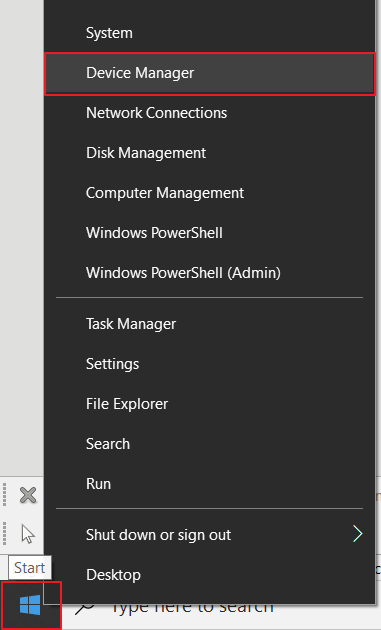
1. Right-click the Windows Start button and select Device Manager.
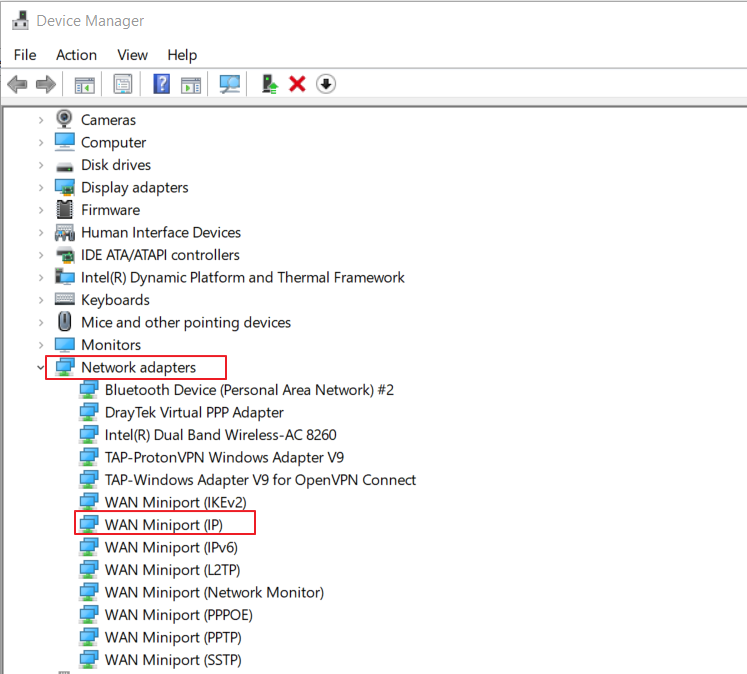
2. Find the WAN Miniport (IP) Device under Network adapters
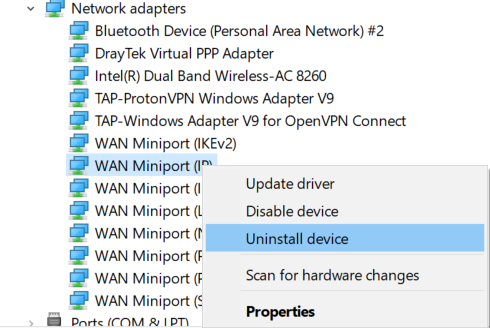
3. Right-click the WAN Miniport (IP) device and click Uninstall device.
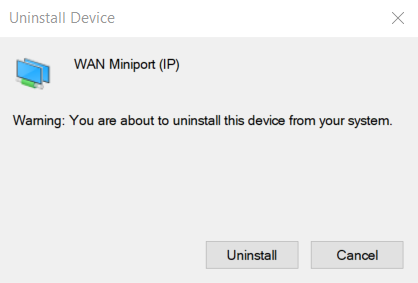
4. Confirm the Uninstallation.
5. Select “Scan for hardware changes” from Device Manager >> Action, then the WAN Miniport device will be installed automatically.
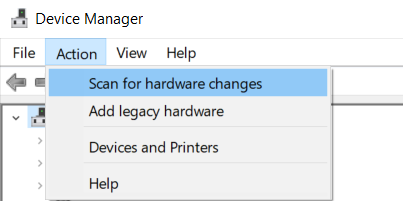
6. Run Smart VPN Client. VPN should be able to dial-up now.
Method 2: Reset the TCP/IP stack with the “netsh int ip reset” command

1. Enter “cmd” from the Windows search menu and select Run as administrator to open Command Prompt App.
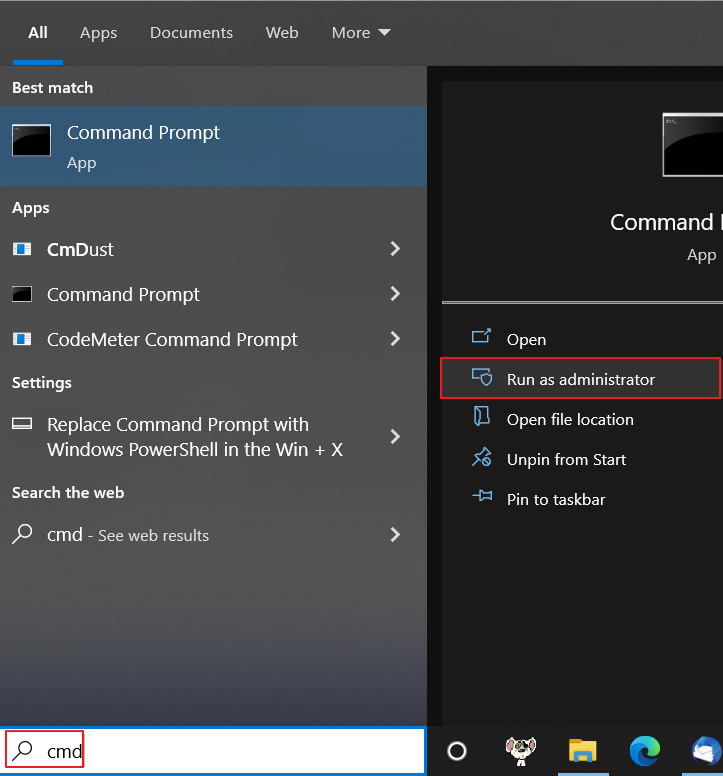
2. Enter the command “netsh int ip reset” to reset the TCP/IP settings in the Network adapters.
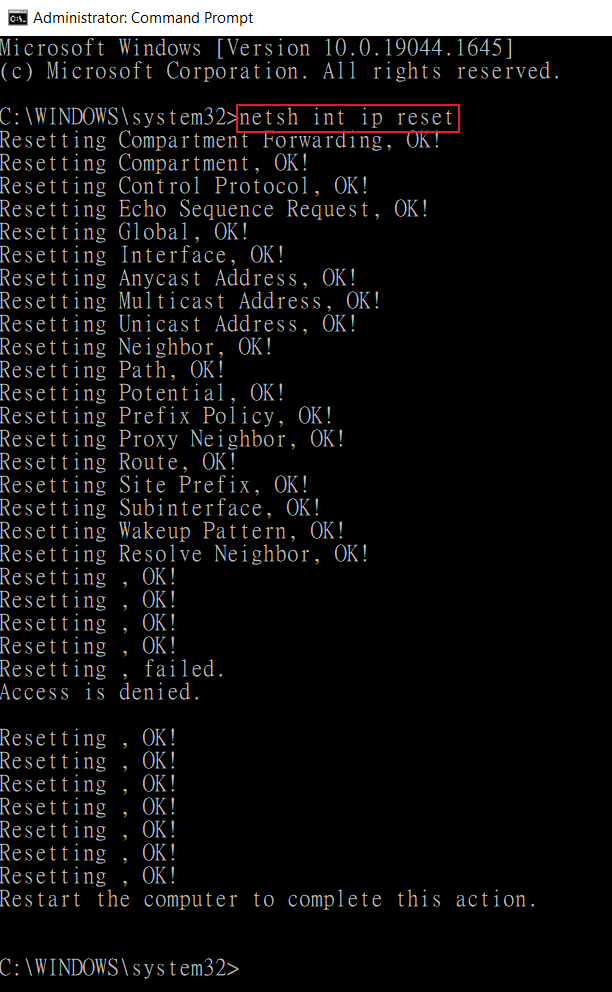
Note that the PPP link error may also happen when the client fails to get an IP address from the VPN server. We may check the VPN server’s log if the above method doesn’t solve the issue.

2023年3月30日 星期四

ZOTECH P102s 列印不正常

問題:
目前
p101s伺服器在網路上說被p102s取代

但安裝後,發生時而可印,時而不可印

ZOTECH公司回覆 
P102S沒有測試過TSC345, 無法確認是否可以搭配使用

請進入P102S網頁, 將 Bi-direction模式設定為 “停用” 或是 將印表機種類設為 “點陣” , 再試看看


2023年2月6日 星期一

GMail Google 擋信 設定 SPF DMARC 方法

 UMail DNS 設定方式

PCHome DNS 代管設定方式

固定格式

請將底下的 ublink.org 和 IP mail 更換成貴公司的就可以了

ublink.org:v=spf1 mx a ip4:59.125.9.159/24 ip4:220.134.227.77 ip6:2001:b030:800f::214 -all

_dmarc.ublink.org:v=DMARC1; p=quarantine; rua=mailto:admin@ublink.org;

或是格式

ublink.org:v=spf1 mx a ip4:59.125.9.159 include:spf.ms.hinet.net -all

_dmarc.ublink.org:v=DMARC1; p=quarantine; rua=mailto:admin@ublink.org;

2022年11月2日 星期三

WINDOW 10 改網卡 MAC(實體位址)

打開“網絡連接”,然後右鍵WLAN,點擊“內容”>進階


若有“Network Address”選項則可以直接更改mac地址(需要注意的是mac地址的第二位必須爲2、6、A、E中的一個,否則修改不生效,如:520000000000)

若在“進階”裏沒有“Network Address”選項,則可以根據如下步驟來進行設置:
1.輸入“win + r”,然後輸入“regedit”進入
“HKEY_LOCAL_MACHINE\SYSTEM\CurrentControlSet\Control\Class\{4d36e972-e325-11ce-bfc1-
08002be10318}”:


2.然後在此頁面右鍵:“新建”-->“字符串值”,名稱改爲“NetworkAddress”,值寫入想改的mac地址值(注意:mac地址的第二位必須爲2、6、A、E中的一個,否則修改不生效)


3.然後展開“Ndi/Params”在“Params”上右鍵:“新建”-->“項”,寫入“NetworkAddress”


2022年10月12日 星期三

Windows 10 開機自動執行的啟動資料夾( Startup Folder)


Windows 10系統,「啟動」資料夾分系統與個人的位置

系統啟動資料夾的位置:
c:\ProgramData\Microsoft\Windows\Start Menu\Programs\StartUp


方法1
你也可以使用按下〔Win〕+〔R〕帶出執行視窗,輸入「shell:Common Startup」並按下〔確定〕即可進入系統啟動資料夾的位置。


方法2
想要使用檔案總管直接開啟,首先必須打開「隱藏的項目」選項。

====================================

個人帳號都有各自的桌面與程式捷徑,「啟動」資料夾
c:\使用者\用戶名稱\AppData\Roaming\Microsoft\Windows\Start Menu\Programs\Startup


方法1


方法2
想要使用檔案總管直接開啟,首先必須打開「隱藏的項目」選項。

2022年7月28日 星期四

取消Windows 11 強制登入微軟帳號

方法一


按下鍵盤上的「Shitf + F10」就可以開啟 CMD 視窗。
如果按下去沒有反應,請試試看「fn + Shift + F10」組合,應該就可以順利呼叫開啟 CMD。


在 CMD 視窗內輸入以下指令 ipconfig /release


接下來把 CMD 視窗關閉,並且按一下左上角的箭頭退回上一步驟。


按下退回上一步按鍵後,就可以建立「離線帳戶」來進行登入囉!


2022年6月10日 星期五

防毒軟體排除 程式解決方法


用管理員權限打開Windows PowerShell
並輸入Get-AppxPackage Microsoft.SecHealthUI -AllUsers | Reset-AppxPackage


智慧型應用程式控制

現象: 解法